



Who this guide is for: Solana users who swap tokens, provide liquidity, or launch tokens, and anyone looking at the RAY token.
What we tested (5 Nov 2026): raydium.io (it opens straight into the Swap app), the Liquidity, Portfolio, Launchlab, Staking and Bridge pages, the wallet connect and slippage dialogs, the docs home, DeFiLlama and CoinMarketCap. Screenshots at desktop 1440×900, tablet 1024×1366 and phone 430×932.
What we did NOT test: We did not connect a wallet, swap, deposit, stake, create a pool or launch a token. Every wallet-dependent step is marked (Not verified). Older-research items are labeled.
What Raydium is, in plain English
Raydium is an automated market maker (AMM) on Solana. You swap tokens against liquidity pools, and anyone can add liquidity to earn a share of fees. The site also has a token launchpad (Launchlab), RAY staking and a bridge. DeFiLlama describes it as an AMM on Solana with permissionless pool creation.
Background: who is behind Raydium
The current interface includes standard pools, concentrated pools, a launch platform (LaunchLab), staking, a bridge screen, and a Perpetuals tab.
Why it matters: Raydium hosts liquidity for many newly launched Solana tokens, including those launched through its own LaunchLab. Our live capture shows this: the pool list on 5 Nov 2026 mixes SOL and USDC with tokenized-stock pairs such as MSFTx, CRCLx and SPCX, plus smaller community tokens.
The plain-English analogy
An AMM is a vending machine for tokens instead of a stock exchange. There is no seller waiting on the other side. Instead, many users put pairs of tokens (for example SOL and USDC) into a shared pool, and the machine's formula sets the price based on how much of each token is left. When you swap, you take one token out and put the other in. In return for supplying the tokens, pool providers earn a small fee on every trade.
Three kinds of pools
| Pool type | What it is | Who it suits |
|---|---|---|
| Standard (AMM v4 / CPMM) | Your tokens spread across the full price range | Beginners who want a simple set-and-forget pool |
| Concentrated (CLMM) | You pick a price range; your money earns more fees only while the price stays inside it | Active users who will check positions regularly |
| LaunchLab pools | New tokens launched with a bonding curve, then moved to a normal pool ("Graduated") | Traders hunting new launches, with high risk |
Live numbers (5 Nov 2026)
| Metric | Value | Source |
|---|---|---|
| TVL | $1.079B | DeFiLlama |
| TVL (CMC) | $1.07B | CoinMarketCap |
| Pools TVL shown in the app | $1,853,731,434.7 (desktop), $1.91B (phone) | raydium.io |
| 24h volume in the app | $322,857,486.19 | raydium.io |
| Fees, 30 days | $12.93M | DeFiLlama |
| Revenue, 30 days | $2.03M | DeFiLlama |
| Holders revenue, 30 days | $1.32M | DeFiLlama |
| Earnings (annualized) | $26M | DeFiLlama |
| DEX volume, 30 days | $4.902B | DeFiLlama |
| Perp volume, 30 days | $252.74M | DeFiLlama |
| RAY price | $1.76 (+11.42% 24h) | CoinMarketCap |
| Market cap | $476.93M (CMC), $475.86M (DeFiLlama) | both |
| FDV | $978.49M (CMC) | CoinMarketCap |
| CMC rank | #88 | CoinMarketCap |
| Supply | 269.96M circulating, 554.99M total, 555M max | CoinMarketCap |
| Holders | 210.52K | CoinMarketCap |
| Staked RAY | $78.73M (16.54% of market cap) | DeFiLlama |
The app's TVL figure changes between captures ($1.85B on desktop, $1.91B on tablet and phone), so it moves live and is slightly different from DeFiLlama's.
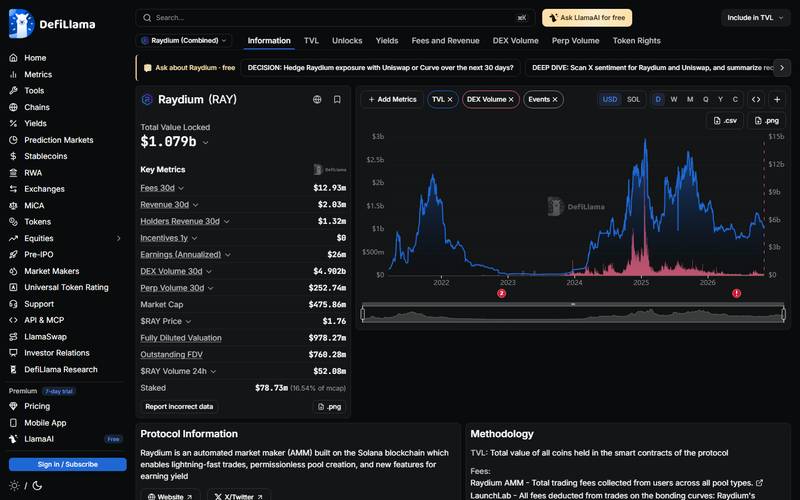
DeFiLlama: TVL $1.079B.
What you see: The chart shows TVL and DEX volume.
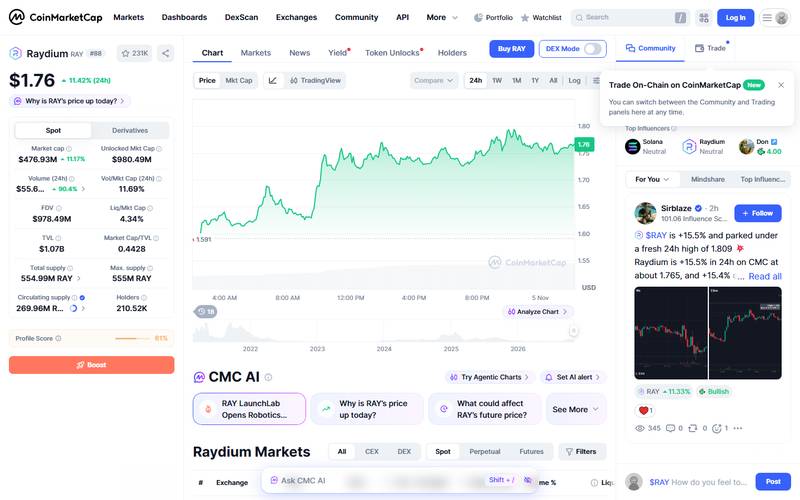
CoinMarketCap: RAY $1.76, rank #88.
What you see: CoinMarketCap shows RAY at $1.76 with rank #88 on 5 Nov 2026. I use it only as a market check, next to the TVL and volume numbers from DeFiLlama.
How Raydium looks on your device
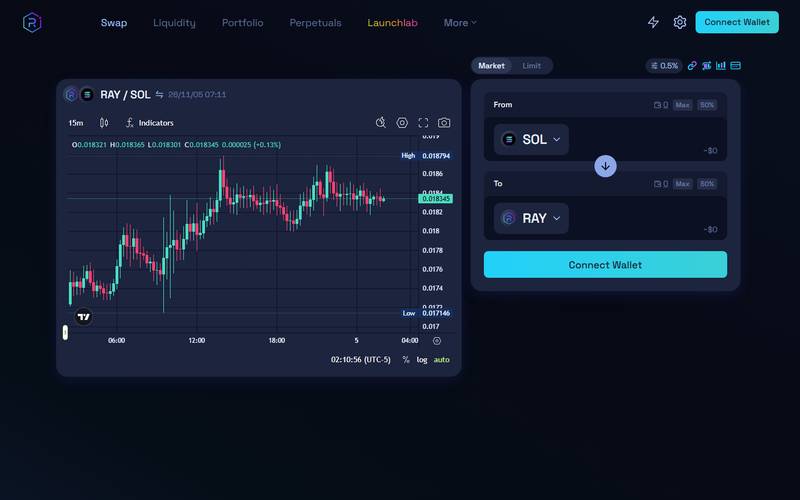
Desktop (1440×900): the home page is the swap screen.
What you see: Menu: Swap, Liquidity, Portfolio, Perpetuals, Launchlab, More. A chart for RAY/SOL sits on the left and a From/To swap box on the right, with a Connect Wallet button.
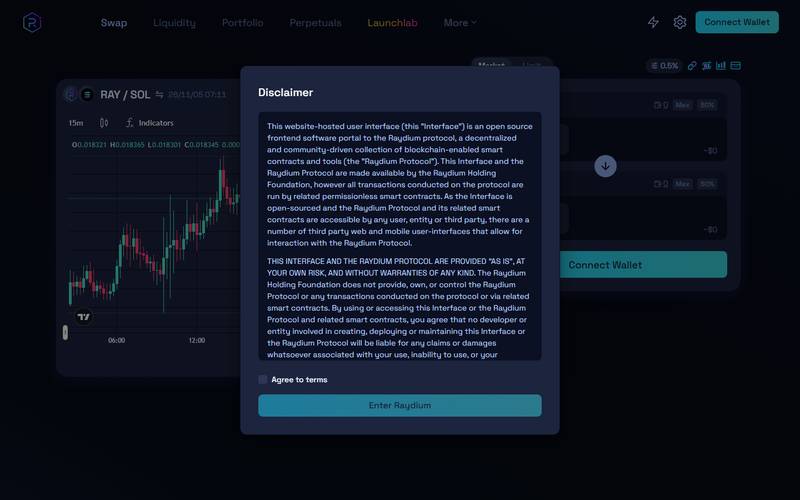
On first visit a Disclaimer dialog appears.
What you see: It says the interface is an open-source frontend to the Raydium protocol, provided "as is", with no liability. You must tick "Agree to terms" and press "Enter Raydium".
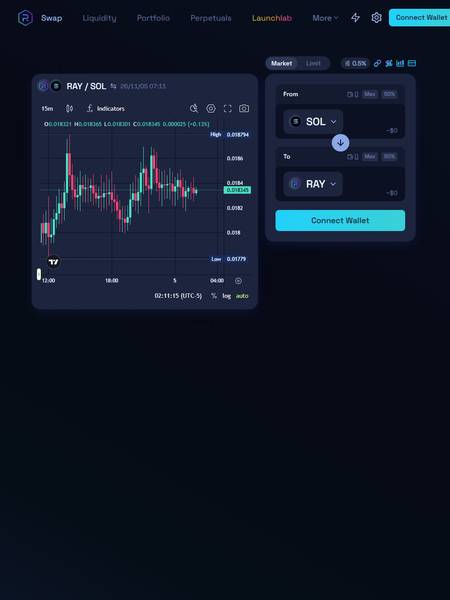
Tablet (1024×1366): same two-panel layout.
What you see: Tablet (1024×1366): same two-panel layout; the right edge of the Connect Wallet button is slightly cut off.
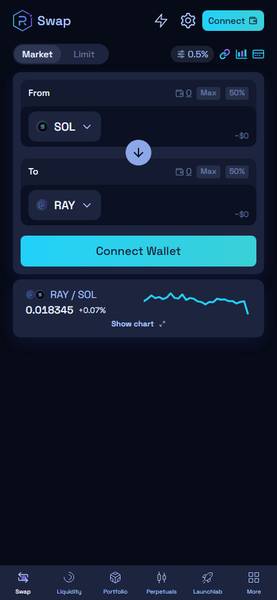
Phone (430×932): a single-column Swap screen.
What you see: A bottom bar holds Swap, Liquidity, Portfolio, Perpetuals, Launchlab and More. A small RAY/SOL chart card shows 0.018345 (+0.07%).
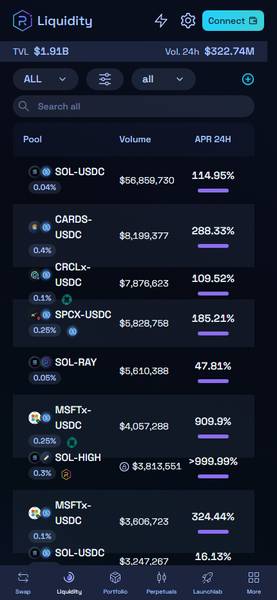
Liquidity on a phone.
What you see: Liquidity on a phone: TVL $1.91B, 24h volume $322.74M, with Pool, Volume and APR 24H columns.
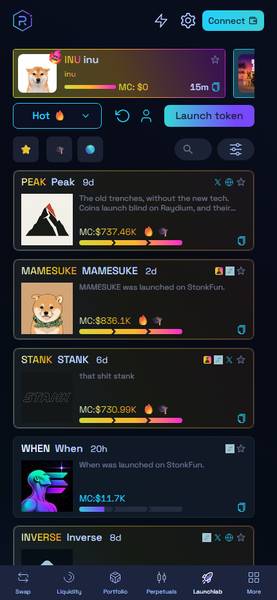
Launchlab on a phone.
What you see: Launchlab on a phone: a list of tokens such as PEAK, MAMESUKE and STANK with market caps.
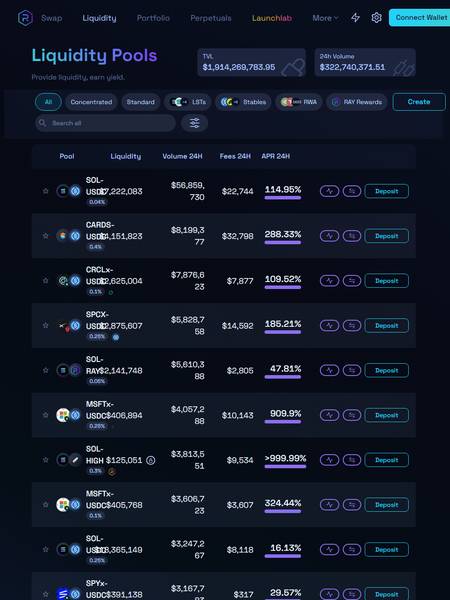
Liquidity on a tablet.
What you see: At this width some pool names and liquidity numbers overlap, which is a layout flaw.
Core features
Swap
The swap box has Market and Limit tabs, a From token (SOL by default), a To token (RAY), Max and 50% shortcuts, and a slippage setting of 0.5%.
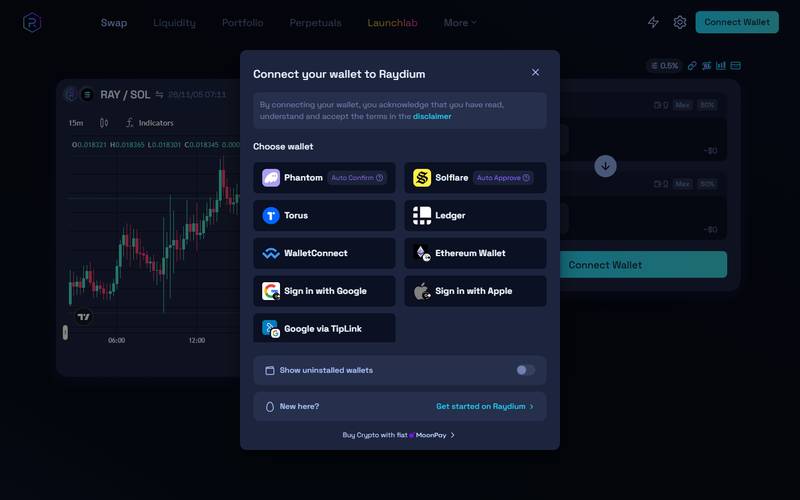
Swap with wallet dialog.
What you see: Connect your wallet to Raydium: Phantom (Auto Confirm), Solflare (Auto Approve), Torus, Ledger, WalletConnect, Ethereum Wallet, Sign in with Google, Sign in with Apple, and Google via TipLink. There is a "Show uninstalled wallets" switch, a "New here? Get started on Raydium" link and "Buy Crypto with fiat MoonPay".
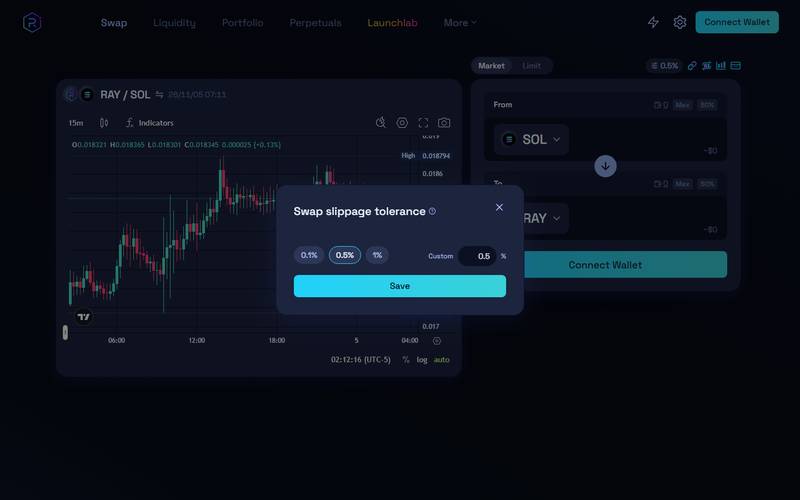
"Swap slippage tolerance" offers 0.1%, 0.5% (default) and 1%, plus a custom field.
What you see: The slippage box has three quick values, 0.1%, 0.5% (the default) and 1%, plus a custom field. Lower slippage protects the price but a trade can fail on fast markets. For a first test I leave 0.5%.
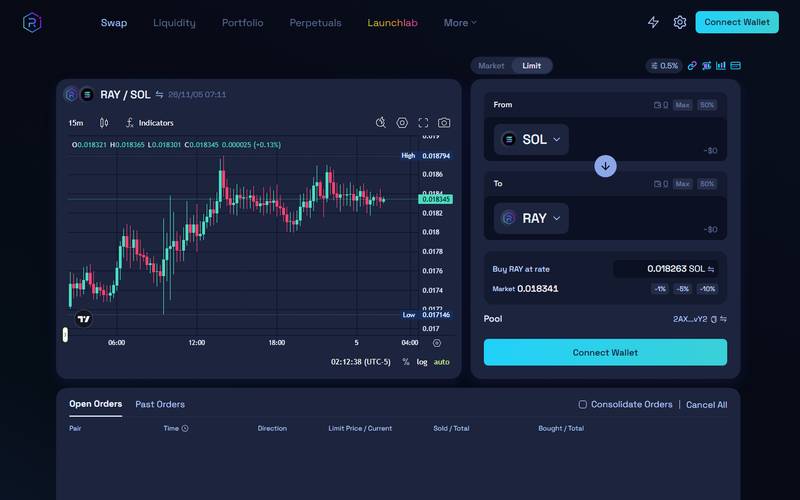
The Limit tab shows "Buy RAY at rate" 0.018263 SOL.
What you see: The Limit tab shows "Buy RAY at rate" 0.018263 SOL, quick buttons -1%, -5%, -10% against a market price of 0.018341, and a Pool address. Below are Open Orders and Past Orders tabs.
Liquidity pools
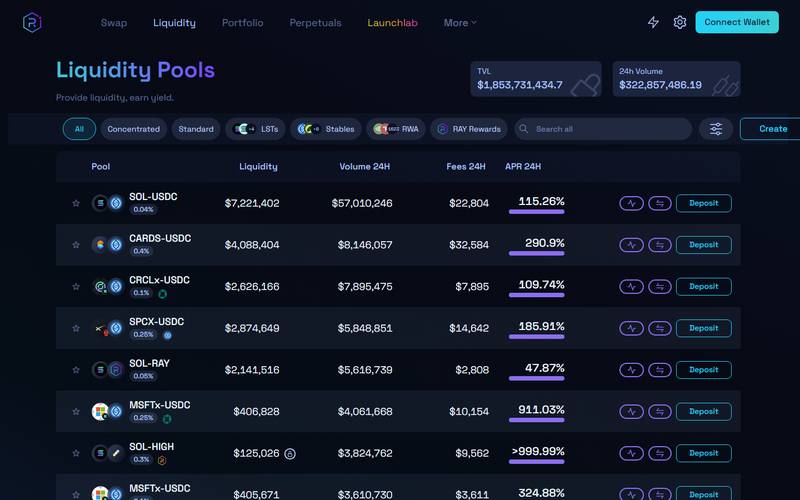
Header: TVL $1,853,731,434.7 and 24h Volume $322,857,486.19.
What you see: Filters: All, Concentrated, Standard, LSTs, Stables, RWA, RAY Rewards, plus a Create button.
| Pool | Fee tier | Liquidity | Volume 24h | Fees 24h | APR 24h |
|---|---|---|---|---|---|
| SOL-USDC | 0.04% | $7,221,402 | $57,010,246 | $22,804 | 115.26% |
| CARDS-USDC | 0.4% | $4,088,404 | $8,146,057 | $32,584 | 290.9% |
| CRCLx-USDC | 0.1% | $2,626,166 | $7,895,475 | $7,895 | 109.74% |
| SPCX-USDC | 0.25% | $2,874,649 | $5,848,851 | $14,642 | 185.91% |
| SOL-RAY | 0.05% | $2,141,516 | $5,616,739 | $2,808 | 47.87% |
| MSFTx-USDC | 0.25% | $406,828 | $4,061,668 | $10,154 | 911.03% |
| SOL-HIGH | 0.3% | $125,026 | $3,824,762 | $9,562 | >999.99% |
Very high APRs (911% and above) sit on small pools. APR is based on 24-hour fees and is not a promise.
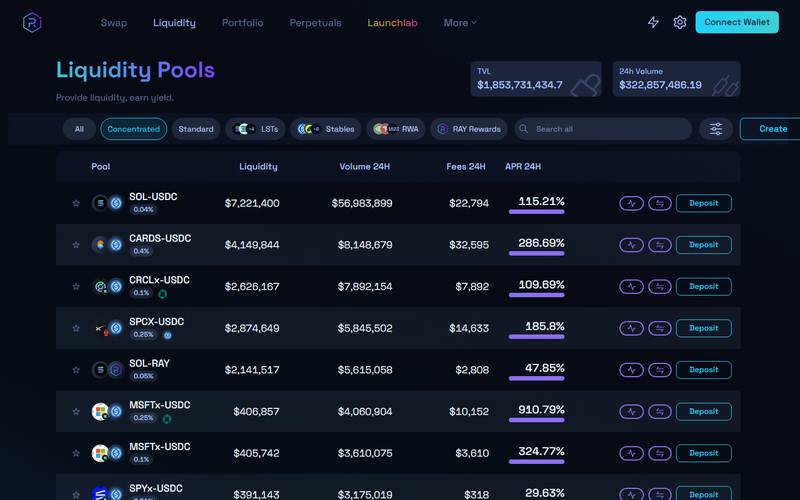
The Concentrated filter: SOL-USDC APR 115.21%, CARDS-USDC 286.69%, SPCX-USDC 185.8%, SOL-RAY 47.85%.
What you see: After I pick the Concentrated filter, the list shows pairs with very high APR: SOL-USDC at 115.21%, CARDS-USDC at 286.69%, SPCX-USDC at 185.8% and SOL-RAY at 47.85%. High APR usually comes with a narrow price range and higher risk of impermanent loss.
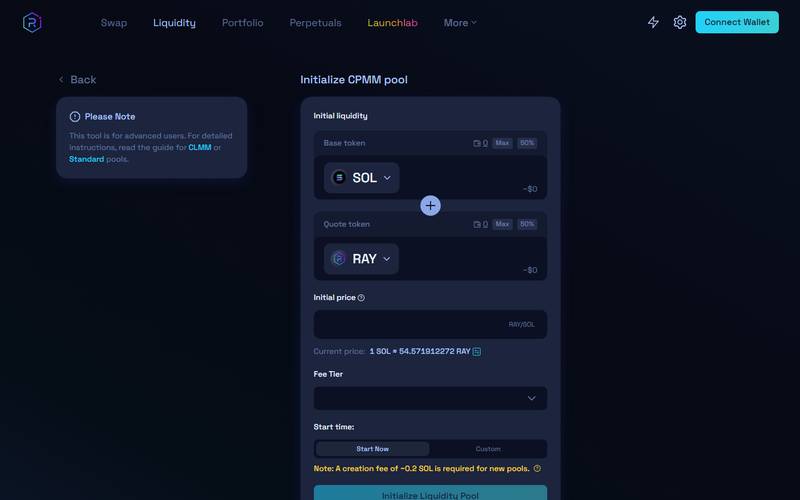
"Initialize CPMM pool".
What you see: "Initialize CPMM pool": base and quote token, initial price, fee tier and start time (Start Now or Custom). A note says the tool is for advanced users, and a yellow note says "a creation fee of ~0.2 SOL is required for new pools".
Portfolio
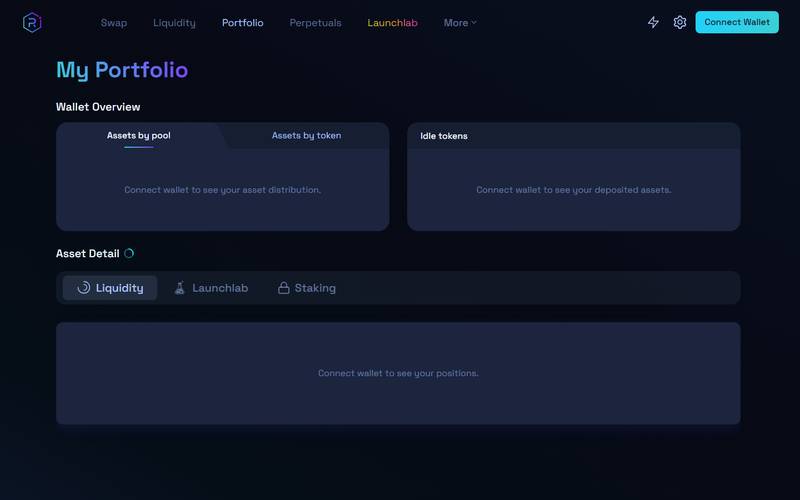
"My Portfolio" without a wallet shows Assets by pool.
What you see: "My Portfolio" without a wallet shows Assets by pool, Assets by token, Idle tokens and Asset Detail tabs for Liquidity, Launchlab and Staking. Each says "Connect wallet to see".
Launchlab
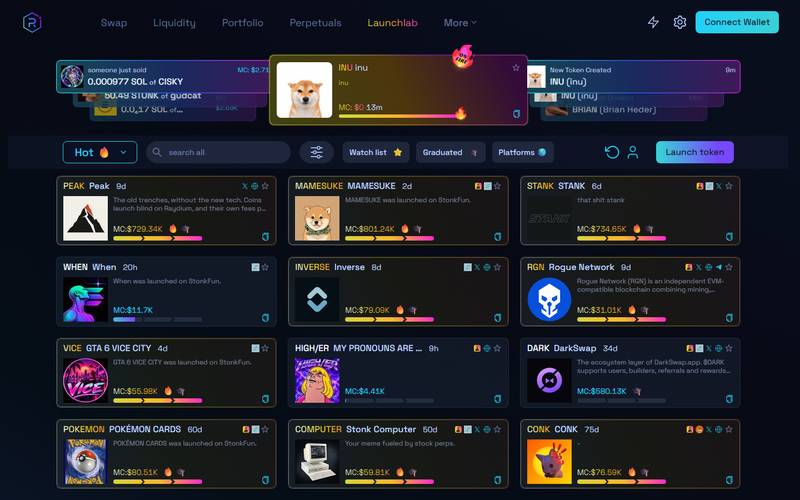
A token launchpad.
What you see: A token launchpad: a ticker strip ("someone just sold…"), a Hot sort, search, Watch list, Graduated, Platforms and a Launch token button. Sample cards with market caps: PEAK $729.34K, MAMESUKE $801.24K, STANK $734.65K, VICE $55.98K, DARK $580.13K.
Staking
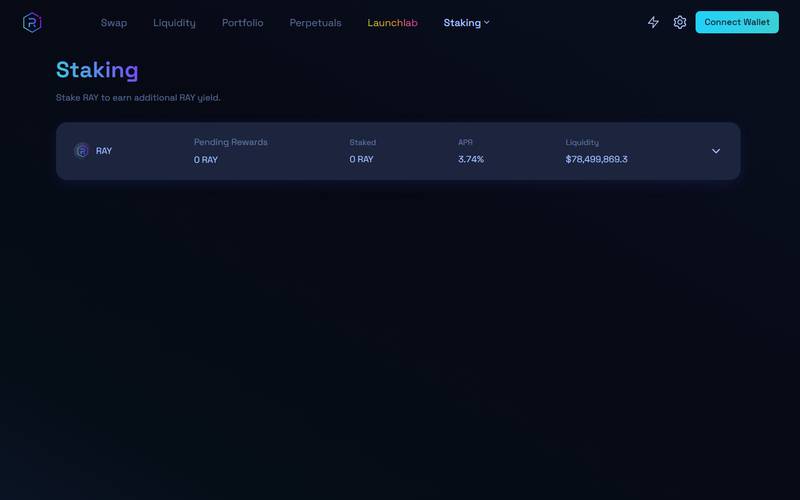
"Stake RAY to earn additional RAY yield." One RAY row.
What you see: "Stake RAY to earn additional RAY yield." One RAY row: APR 3.74%, liquidity $78,499,869.3, with Pending Rewards and Staked at 0 (no wallet).
Bridge
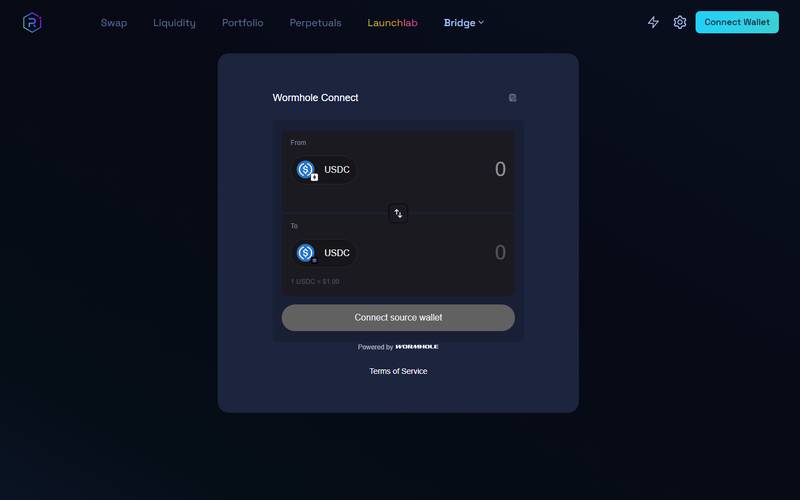
Wormhole Connect: From USDC to USDC on Solana.
What you see: Wormhole Connect: From USDC to USDC on Solana, "1 USDC = $1.00", and a "Connect source wallet" button.
More menu
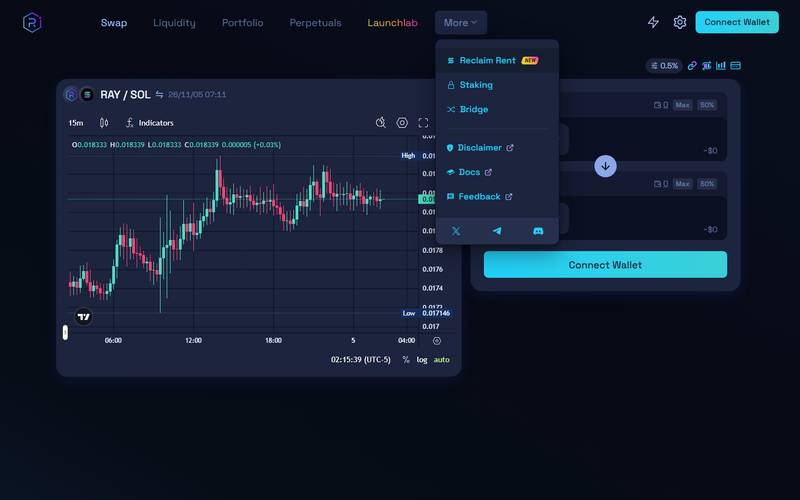
The More menu.
What you see: The More menu: Reclaim Rent (NEW), Staking, Bridge, Disclaimer, Docs and Feedback, plus links to X, Telegram and Discord.
The Perpetuals tab did not load a separate page in our capture, so we do not describe it. (Not verified)
Understanding the pool table (read before you deposit)
The APR column in the pool table is tempting. Here is how to read it.
- APR 24H is a one-day snapshot. It is fees earned yesterday, scaled up to a year. A pool that had a busy day looks great; the next quiet day can drop it by half.
- High APR usually means small or risky pools. In our capture, MSFTx-USDC showed 911.03% and SOL-HIGH showed over 999.99%, but their liquidity was only about $406,828 and $125,026. SOL-USDC, with about $7.2M of liquidity, showed 115.26%. Compare volume to liquidity: that ratio, not the headline APR, drives the fee income.
- Fee tier matters. SOL-USDC is 0.04% (very liquid, tight price). CARDS-USDC is 0.4% (a more volatile token, so providers ask for more).
- Impermanent loss. If one token in your pair rises or falls sharply compared with the other, you end up holding more of the cheaper token. Compared with simply holding both, you can be behind even when the pool paid fees. This is the main cost of providing liquidity and it is not shown in the APR.
- Concentrated pools raise both reward and risk. A narrow price range earns more fees while the price is inside it, and earns nothing once the price leaves it.
RAY tokenomics
From CoinMarketCap on 5 Nov 2026: 269.96M RAY circulating, 554.99M total, 555M max supply, market cap about $477M and FDV about $978M. The gap between market cap and FDV means a large part of the supply has not reached the market yet. Check the official docs for unlock details. RAY staking showed 3.74% APR in the app, and DeFiLlama shows $78.73M of RAY staked (16.54% of market cap). DeFiLlama also lists $1.32M of 30-day revenue going to holders, which is the number to watch if you care about fee sharing.
Fees
| Item | What we saw |
|---|---|
| Pool fee tiers | 0.04%, 0.05%, 0.1%, 0.25%, 0.3% and 0.4% shown on pools |
| Default slippage | 0.5% |
| Pool creation | ~0.2 SOL creation fee, per the note on the create page |
| Swap and network fees | (Not verified) |
How to use Raydium: step-by-step tutorial
I walked through the real site in a clean browser, from the first disclaimer to the wallet list and the pool pages. I never connected a wallet and never sent a transaction, so the last click of each flow is marked (Not verified). Every screenshot below was taken on 5 November 2026.
Step 1: Open Raydium and accept the disclaimer
First, I type raydium.io straight into the address bar instead of searching for it. Fake Solana sites are common, and a cloned page that asks you to connect a wallet is the oldest trick in the book. As soon as the page loads, a Disclaimer window covers the swap screen.
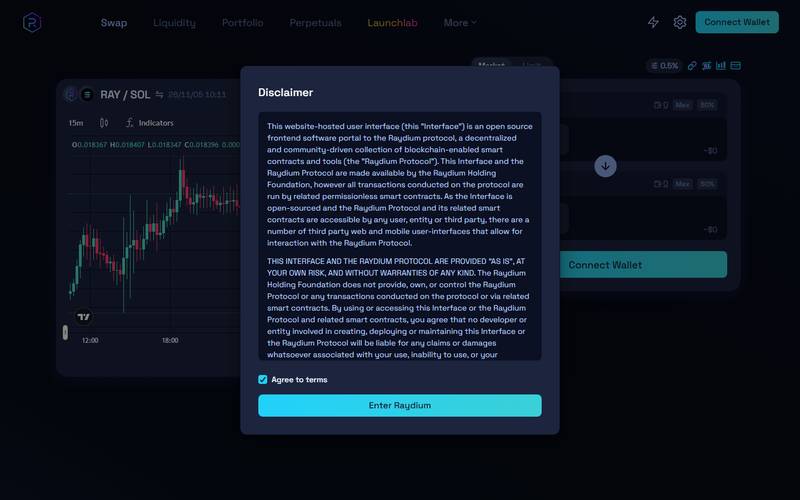
Raydium disclaimer with the Agree to terms box ticked.
What you see: The Disclaimer dialog after I ticked "Agree to terms". The text says the interface is an open-source front end to the Raydium protocol, provided "as is". The blue "Enter Raydium" button at the bottom is now active.
- Read the first lines of the disclaimer. It explains that you alone are responsible for your trades.
- Tick Agree to terms.
- Press Enter Raydium.
Which option should I pick? There is only one way forward. If a site that looks like Raydium asks for your seed phrase at this point, close it. A DEX only needs your wallet to sign transactions, so there is no legitimate reason for it to ask for your seed phrase.
Step 2: Find the swap box
Next, I look at what the home page gives me. Raydium opens on the swap screen, not on a marketing page, which is why it feels like a trading tool from the first second.
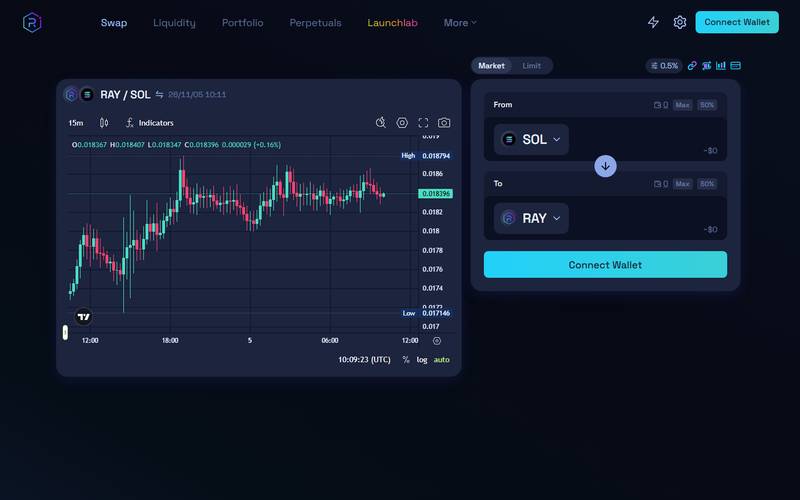
Raydium swap screen with an empty From and To box.
What you see: The swap screen right after the disclaimer. The menu on top reads Swap, Liquidity, Portfolio, Perpetuals, Launchlab and More. A RAY/SOL candle chart sits on the left. On the right is the From / To box with SOL and RAY pre-selected and a Connect Wallet button.
I notice that SOL and RAY are already filled in. That is only a default. You can change both sides in the next steps.
Step 3: Type an amount and read the quote
Now I click the From box and type 1. The To box fills in by itself, and a small panel appears under it.
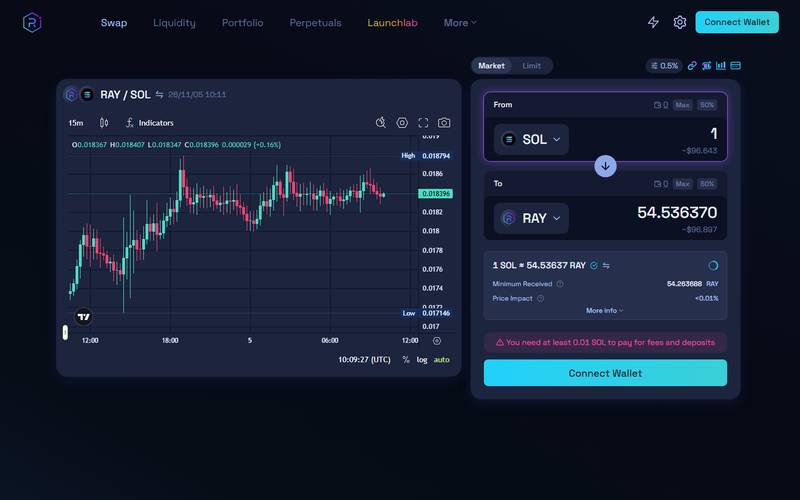
Raydium quote for 1 SOL into RAY.
What you see: After typing 1 SOL, the To box shows about 54.5 RAY. Under it: "1 SOL = 54.53637 RAY", Minimum Received and Price Impact. A red notice says "You need at least 0.01 SOL to pay for fees and deposits" because no wallet is connected.
I read three numbers before anything else: the rate, the minimum received and the price impact. For a pair as busy as SOL/RAY the price impact stays tiny. On a thin token it can jump, and that is the signal to lower the size.
Step 4: Open "More Info" to see the route and fees
Then I click "More Info" under the quote to see how Raydium plans to fill the order.
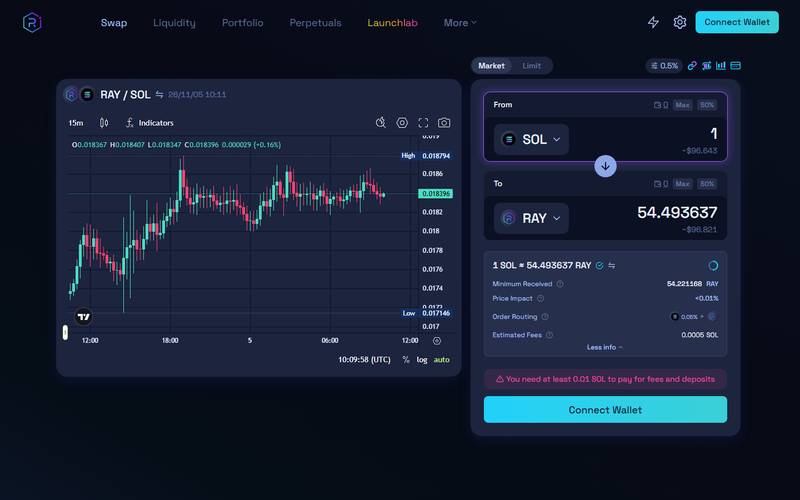
Raydium More Info panel showing routing and estimated fees.
What you see: The expanded quote. It now lists Order Routing and Estimated Fees on top of Minimum Received and Price Impact. The estimated fee for this swap is a fraction of a SOL.
This is the part many beginners skip. The routing line tells you whether the trade goes through one pool or is split over several, and the fee line shows an estimated fee before you sign. We did not verify final transaction or network costs.
Step 5: Choose a different token
If I want another pair, I click the token name. A search window opens.
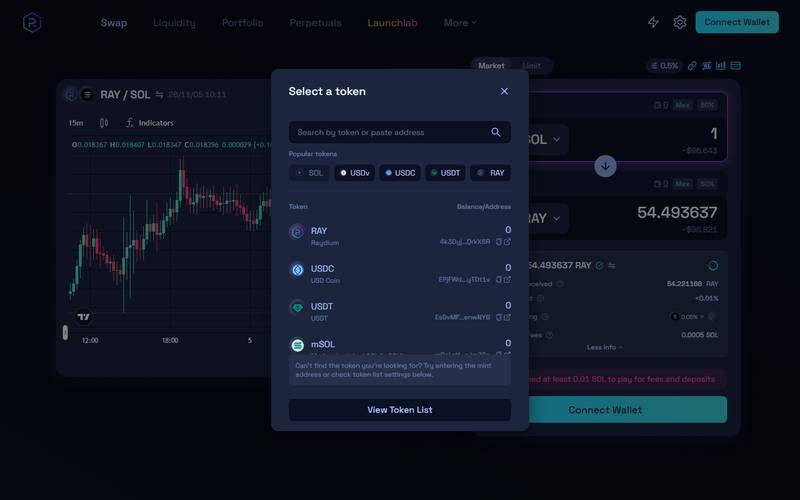
Raydium Select a token window.
What you see: The "Select a token" window. A search box accepts a name or a pasted address. Below it are quick buttons (SOL, USDv, USDC, USDT, RAY) and a list with RAY, USDC and USDT. A "View Token List" button is at the bottom.
Which option should I pick? For anything outside the quick buttons, paste the token address from the project's official site or X account. Several tokens can share the same name, and only the address is unique.
Step 6: Check slippage before you trade
After that, I open the small gear icon at the top of the swap box.
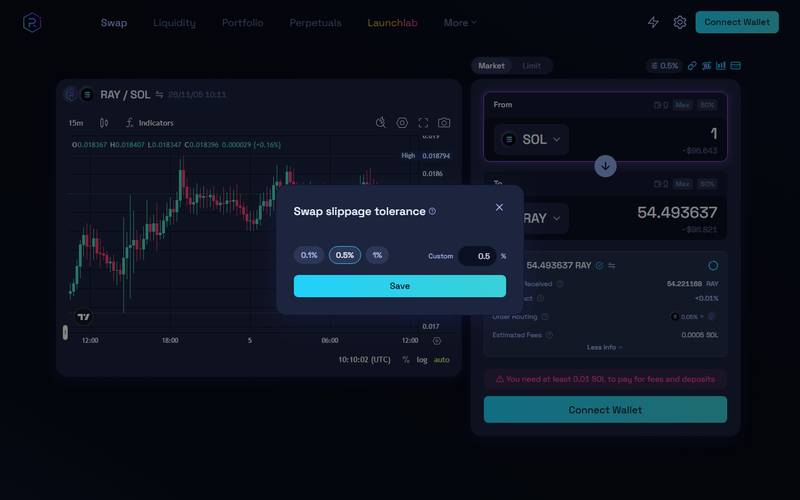
Raydium slippage tolerance window.
What you see: "Swap slippage tolerance" with three presets, 0.1%, 0.5% and 1%, a custom field and a Save button. The current value is 0.5%.
For a big pair such as SOL/USDC I leave it at 0.5% or lower. Raising it makes a trade on a thin token go through more easily, but it also lets the price move against you by that much.
Step 7: Connect a wallet and confirm the swap (not captured)
At this point I stop. The Connect Wallet button opens the wallet list and I did not link a real wallet to a test session.
Raydium wallet list.
What you see: The wallet list: Phantom, Solflare, Torus, Ledger, WalletConnect, an Ethereum wallet, Sign in with Google, Sign in with Apple and Google via TipLink.
- Press Connect Wallet and choose the wallet you already use.
- Check the quote one more time, then press Swap.
- Approve the request in your wallet. Keep a little SOL for network fees. (Not verified)
Step 8: Try a limit order (optional)
If I do not want to buy at the market price, I switch from the Market tab to the Limit tab.
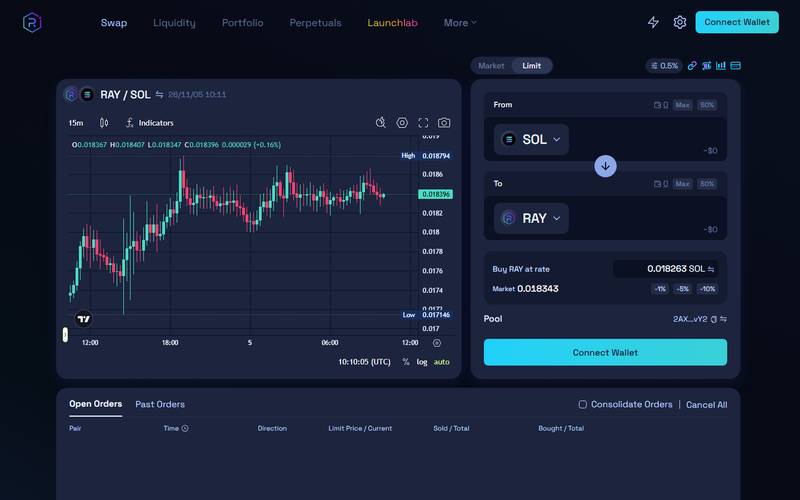
Raydium Limit tab with a rate filled in.
What you see: The Limit tab with SOL and RAY selected. "Buy RAY at rate" shows 0.018263 SOL next to a market price of 0.018343. Quick buttons -1%, -5% and -10% sit under the rate, and an Open Orders / Past Orders table is below.
The idea is simple: I set my own price, and the order waits until the market reaches it. I use the -5% button to see how far below the market the price would sit.
Step 9: Browse the liquidity pools
Then I open Liquidity in the top menu and pick the Concentrated filter.
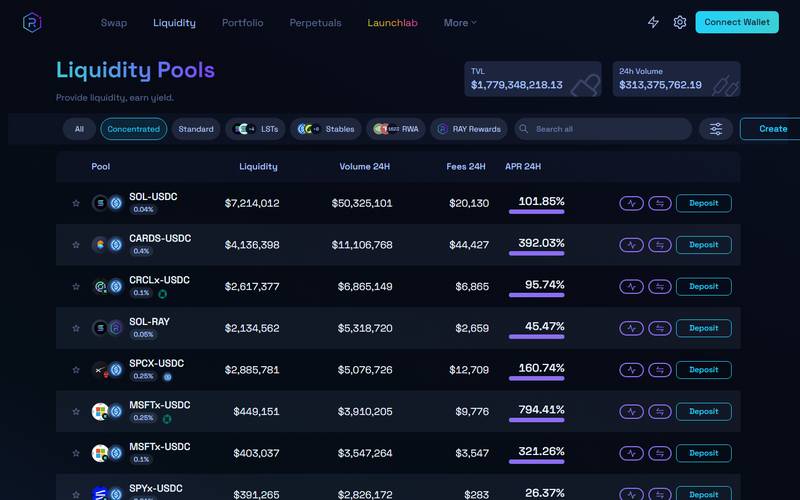
Raydium liquidity pools filtered to Concentrated.
What you see: Liquidity Pools with the Concentrated filter active. TVL and 24h volume are at the top. Each row shows Liquidity, Volume 24h, Fees 24h and APR, for example SOL-USDC with an APR above 100%.
A high APR here is a snapshot. It moves every hour and it only counts while your price range stays active.
Step 10: Look at a deposit page
When I press Deposit on SOL-USDC, Raydium opens the position builder.
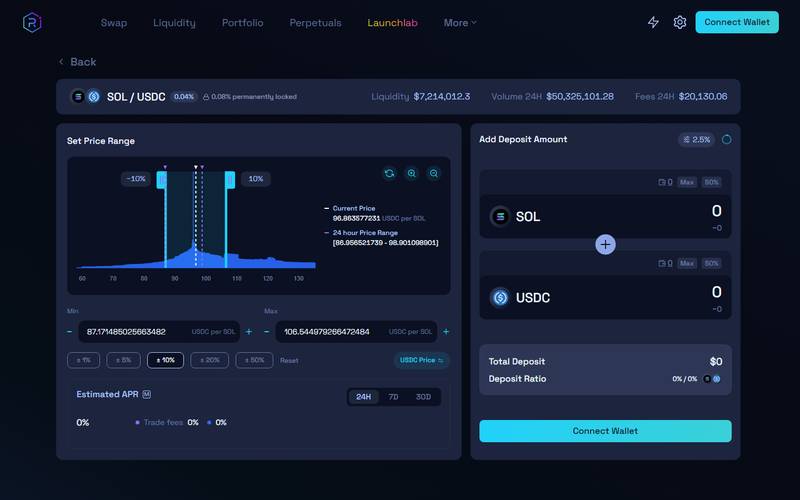
Raydium concentrated liquidity position page with a price range.
What you see: The SOL/USDC position page. The left side shows "Set Price Range" with a chart and a -10% / +10% band around the current price. The right side shows "Add Deposit Amount" for SOL and USDC and a Connect Wallet button at the bottom.
Which pool type should I pick? Start with a Standard pool and a small amount. Try Concentrated only after you understand price ranges. Press Deposit and approve in your wallet (Not verified).
Step 11: Peek at Launchlab
Last, I open Launchlab from the top menu to see where new tokens come from.
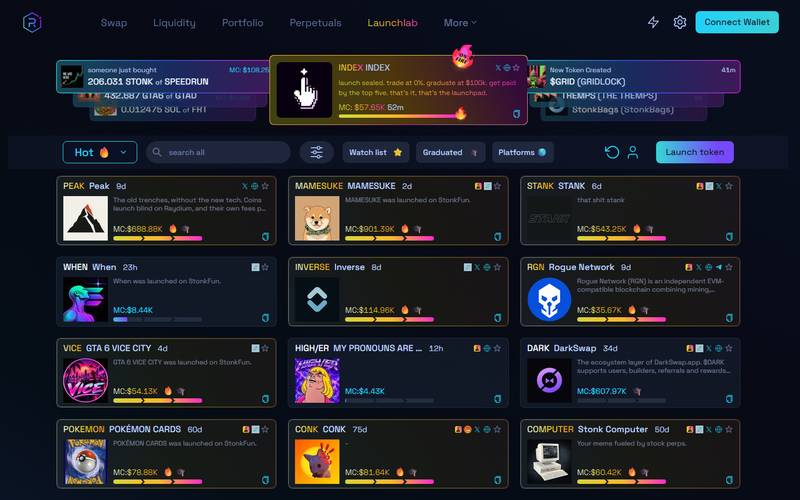
Raydium Launchlab token list.
What you see: The Launchlab page: a live ticker of recent buys on top, a "Hot" filter and a grid of newly launched tokens with market caps and progress bars.
I treat this page as a place to look, not to shop. Most tokens here are new and some will go to zero.
Step 12: Check your positions
After any deposit or swap, I come back to the Portfolio page and compare it with what I expected. Without a connected wallet it stays empty, so I could not test it.
The Portfolio page.
What you see: It shows no data without a connected wallet.
Earn guide: providing liquidity
- Open Liquidity and choose a pool type (Concentrated or Standard). Seen.
- Press Deposit on a pool row. Seen: it opens the position builder with a price range and deposit amounts (Step 10 above). We did not connect a wallet or submit a deposit. (Not verified)
- Approve the transaction and track it in Portfolio. (Not verified)
Referral program: none seen.
Custody and limits. Raydium does not open an account for you: the app asks you to connect your own Solana wallet, and every swap or deposit is a transaction you sign in that wallet. The Disclaimer we captured describes the protocol as permissionless and used at your own risk. We did not find a platform-wide trading limit on the pages we captured; the practical limits are your wallet balance, the liquidity in the pool you choose and the slippage you allow. Front-end access can still be restricted in some regions, which we did not test.
RAY token (older research plus live data)
- Live data is in the table above. Staking pays 3.74% APR according to the app.
- Older research (not re-checked): RAY is used for staking and governance, and this was not re-checked for this update.
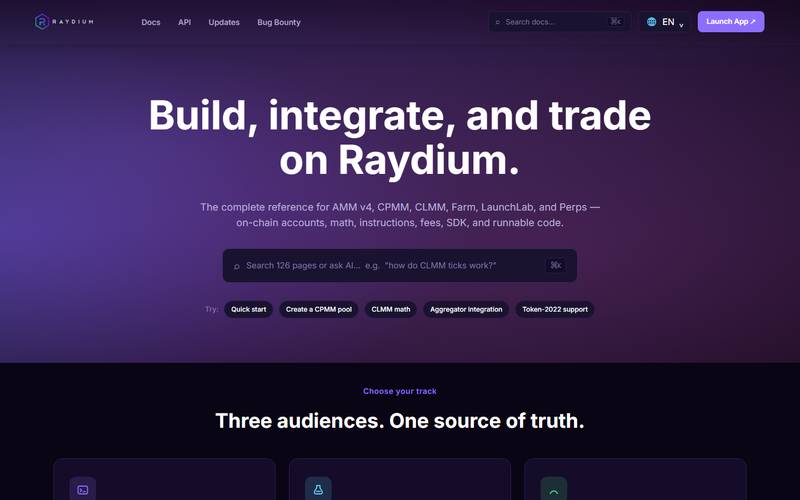
docs.raydium.io: "Build, integrate, and trade on Raydium".
What you see: docs.raydium.io: "Build, integrate, and trade on Raydium", with a reference for AMM v4, CPMM, CLMM, Farm, LaunchLab and Perps. It says it has 126 pages.
Security
The only legal text we read was the Disclaimer, which says the protocol is permissionless and used at your own risk. The docs home links to a Bug Bounty. We did not read audit reports. (Not verified)
Competitors
We compared Raydium with three other Solana venues that a Raydium user would realistically consider. TVL is from DeFiLlama, checked 6 Nov 2026. The role and feature rows come from each project's documentation and our earlier research; we did not test the other three apps.
| Feature | Raydium | Orca | Meteora | Jupiter |
|---|---|---|---|---|
| TVL (DeFiLlama, 6 Nov 2026) | about $1.0B | about $283M | about $245M | Not comparable (an aggregator holds no swap pools; its DeFiLlama TVL comes from other products) |
| Docs | docs.raydium.io | docs.orca.so | docs.meteora.ag | dev.jup.ag |
How to choose between them:
- Just swapping a token: Jupiter checks several pools, including Raydium, Orca and Meteora, and picks a route. For a plain swap it usually saves you from comparing venues by hand.
- Providing liquidity in a concentrated range: Raydium and Orca both offer this. Orca has less TVL but a narrower focus, so compare the fee tier and volume of the exact pool you want on each site before depositing.
- Dynamic fees or vault strategies: Meteora is built around these. They are more complex, so read its docs first.
- Buying newly launched tokens: Raydium (through LaunchLab) is a main venue. New tokens carry a high scam risk, so check the mint address every time.
Risks to know
- Smart contract risk: The docs link a bug bounty, which is a good sign, but we did not read audits.
- Rug pulls on new tokens: Anyone can create a pool or a LaunchLab token. Many fail.
- Scam clones and wallet drainers: Always check the URL and what a transaction asks you to sign.
- Price swings: Solana tokens can move fast. A 24-hour gain such as RAY at +11.42% can reverse.
- Layout flaw: On a tablet, some pool names and liquidity numbers overlap, so use desktop for pool research.
Pros and cons
| Pros | Cons |
|---|---|
| Opens directly into a working swap screen | Disclaimer must be accepted before use |
| Wide wallet choice, including Google and Apple sign-in | Tablet layout overlaps some table text |
| Large pool list with APR, fees and volume | Highest APRs are on tiny pools |
| LaunchLab, staking and bridge in the same app | Perpetuals page not confirmed; no wallet testing |
FAQ
Is Raydium safe? It is a long-running protocol with a bug bounty link in the docs, but the interface is provided "as is". Tokens listed on it are not vetted.
Do I need an account? No. You connect a wallet. The wallet list includes Phantom, Solflare, Ledger and Google or Apple sign-in options.
What does it cost to swap? Pools showed fee tiers such as 0.04% to 0.4%. We did not run a trade, so transaction and network costs are (Not verified).
What is LaunchLab? A launchpad where new tokens start on a curve and later "graduate" to a normal pool. It is high risk.
What is "Reclaim Rent"? A feature in the More menu. We did not open it. In general, Solana accounts hold a small refundable deposit; the tool is presumably for recovering it.
Can I use it on a phone? Yes, the phone layout has a bottom bar with Swap, Liquidity, Portfolio, Perpetuals, Launchlab and More.
Is the 900%+ APR real? It was the 24-hour number on a tiny pool. Do not expect it to last.
Verdict
Raydium is a busy, functional Solana DEX with clear numbers on the public pages and $1.079B TVL on DeFiLlama. We could not test real swaps or deposits. Rating: 4/5 for what is visible, with transactions unverified.
How we got to 4/5. We looked at five areas and gave each the same weight:
| Area | What we found | Result |
|---|---|---|
| Liquidity and activity | About $1.0B TVL on DeFiLlama and over $300M of 24h volume shown in the app | Strong |
| Interface clarity | Swap, pool table and position builder were readable on desktop and phone | Strong |
| Feature range | Market and limit swaps, standard and concentrated pools, LaunchLab, staking and a bridge | Strong |
| Fee transparency | Pool fee tiers and the pool creation fee are shown; swap and network costs were not verified | Limited |
| Hands-on testing | No wallet connected, no swap or deposit made | Limited |
Three strong areas and two limited ones is why we land on 4 rather than 5. If we later complete real transactions, the last two rows, and the score, may change.
Quick links
- App: https://raydium.io
- Docs: https://docs.raydium.io
- DeFiLlama: https://defillama.com/protocol/raydium
Not financial advice. DeFi carries smart-contract and market risk.